



A practical Fabric rollout moves in four steps: choose one use case, prove it on the free 60-day trial capacity, pilot it with real users on a pay-as-you-go F SKU while measuring capacity, then size production from what you measured. Buy reserved capacity only once you know your usage.
If you run data at a mid-sized company, you may not have a platform team ready to run a year-long data program. What you need is evidence, quickly: one business question answered on real data, a clear view of how much capacity that takes, and a decision you can defend.
Microsoft's own capacity guidance points the same way: start on a trial or small capacity for a proof of concept, then increase capacity as you move to pilot and production, only when the data justifies it. This plan turns that guidance into 90 days, with the deliverables, owners, capacity steps and exit criteria for each phase.
If you're still deciding whether Fabric fits your organization at all, or what it costs, start with what Microsoft Fabric is. If your question is how Fabric relates to the Power BI you already use, see Microsoft Fabric vs Power BI.
The 90-Day Plan at a Glance
Four phases, one use case, and a capacity decision based on measurement. The day ranges are a starting point: a simple use case on clean data may move faster, and a use case that pulls from several systems may need longer in Phase 2.
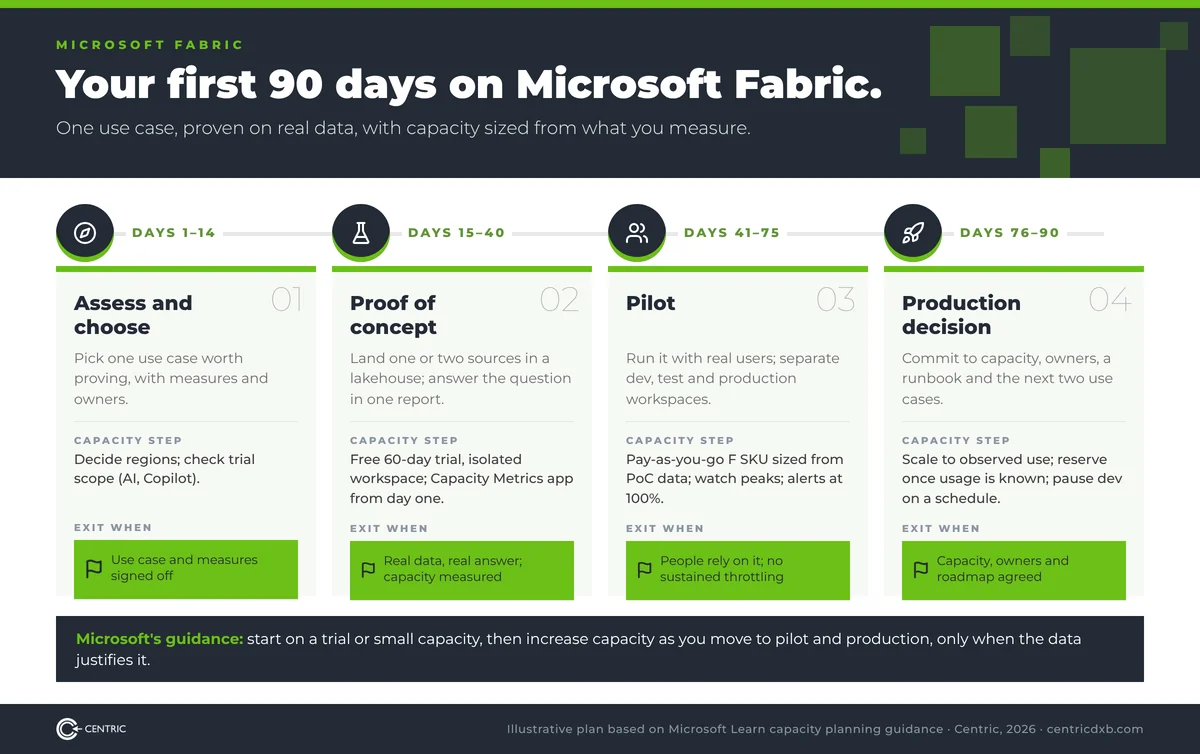
What matters is that each phase ends with its exit criteria met, not with a date.
Phase 1: Assess and Choose (Days 1 to 14)
Goal: pick one use case worth proving, with measures and owners agreed.
- What to do: list the data sources that matter (ERP, CRM, finance spreadsheets, operational systems) and who owns each; choose one use case that answers a real business question, uses data you can reach, and can be measured; agree what success looks like in numbers; name a business sponsor and a technical owner.
- Fabric decisions: decide which region your trial, pilot and production capacities will run in, and check the trial's considerations before you start, for example whether AI and Copilot are in scope. Confirm how your Power BI licensing fits; our Fabric vs Power BI guide covers it.
- Exit criteria: one use case and its measures signed off by the sponsor.
- Owner: the business sponsor, with the data lead.
- How Centric helps: our Microsoft Fabric team starts by evaluating your current data landscape and aligning Fabric with business and technical objectives, including capability assessment and license selection.
Phase 2: Proof of Concept (Days 15 to 40)
Goal: prove the use case on real data, and measure what it costs in capacity.
- What to do: land one or two sources in a lakehouse in OneLake using pipelines or dataflows; shape the data into a clean layer the report can trust; build one semantic model and one report that answers the business question. If you're unsure whether the use case needs a lakehouse, a warehouse or both, see data warehouse vs data lake vs lakehouse, and for the building blocks, the components of Microsoft Fabric.
- Capacity actions: use the free 60-day Fabric trial capacity, in a dedicated workspace so the proof of concept is isolated. Keep the scope narrow: a limited data volume and a small group of users. Install the Fabric Capacity Metrics app on day one and start watching how much capacity the work uses.
- Exit criteria: the report answers the business question on real data, and you have measured capacity use for the full workload, including refreshes.
- Owner: the data lead.
- How Centric helps: we implement OneLake as the single, governed data layer and design the lakehouse and warehouse components so the proof of concept is built on the same foundation production will use.
Validate Microsoft Fabric's Capabilities With Your Own Business Data.
Centric runs Microsoft Fabric proofs of concept for qualifying companies, from the first source to a working report, as an ISO/IEC 27001:2022 certified team.
Talk to Our Fabric Experts!Phase 3: Pilot (Days 41 to 75)
Goal: run the use case with real users, safely, and learn what production will need.
- What to do: set up separate development, test and production workspaces; assign workspace roles so builders, reviewers and readers each get the access they need and no more; move changes between workspaces with deployment pipelines or Git integration rather than by hand; onboard a pilot group of real users and collect their feedback.
- Capacity actions: move from the trial to a pay-as-you-go F SKU sized from what the proof of concept showed. During the pilot, watch peak utilization and throttling in the Capacity Metrics app: Microsoft's guidance is to aim for high but not maxed-out use. Set email alerts so admins hear when the capacity reaches 100% of its provisioned capacity units. If throttling appears, you can resize an F SKU at any time.
- Exit criteria: pilot users rely on the report for real decisions, there's no sustained throttling, and the governance model (roles, workspaces, deployment) is agreed.
- Owner: the data lead, with IT.
- How Centric helps: we set up workspace governance, security configuration and stakeholder enablement so teams can run Fabric as their analytics platform with confidence.
Phase 4: Production Decision (Days 76 to 90)
Goal: commit to an operating model, based on what the pilot measured.
- What to do: write a short runbook (who monitors capacity, who approves changes, what to do when throttling starts); name owners for the data, the semantic model and the report; choose the next two use cases from the backlog, ideally ones that reuse the data you've already landed.
- Capacity actions: scale up so the capacity covers the usage observed in the pilot. Consider reserved capacity only once that usage is known; Microsoft suggests measuring on trial or pay-as-you-go capacity before buying a reserved F SKU. If one capacity can't serve everything, scale out by moving some workspaces to a second capacity. For development and test capacities that sit idle outside working hours, schedule pause and resume; pausing stops the compute meter, while OneLake storage is still billed.
- Exit criteria: production capacity in place, owners named, the runbook agreed, and the next use cases on the roadmap.
- Owner: the business sponsor.
- How Centric helps: before go-live we validate performance, governance and readiness for wider adoption, and we design the platform to support the reporting, analytics and AI work that will follow. For preparing data for AI use cases, see our guide to AI-ready data.
Sizing Capacity Without Guessing
Every Fabric workload draws from the same pool of capacity units (CUs), so sizing is the decision that shapes both performance and spend. The good news is that you don't have to guess: the proof of concept and pilot exist to measure it.
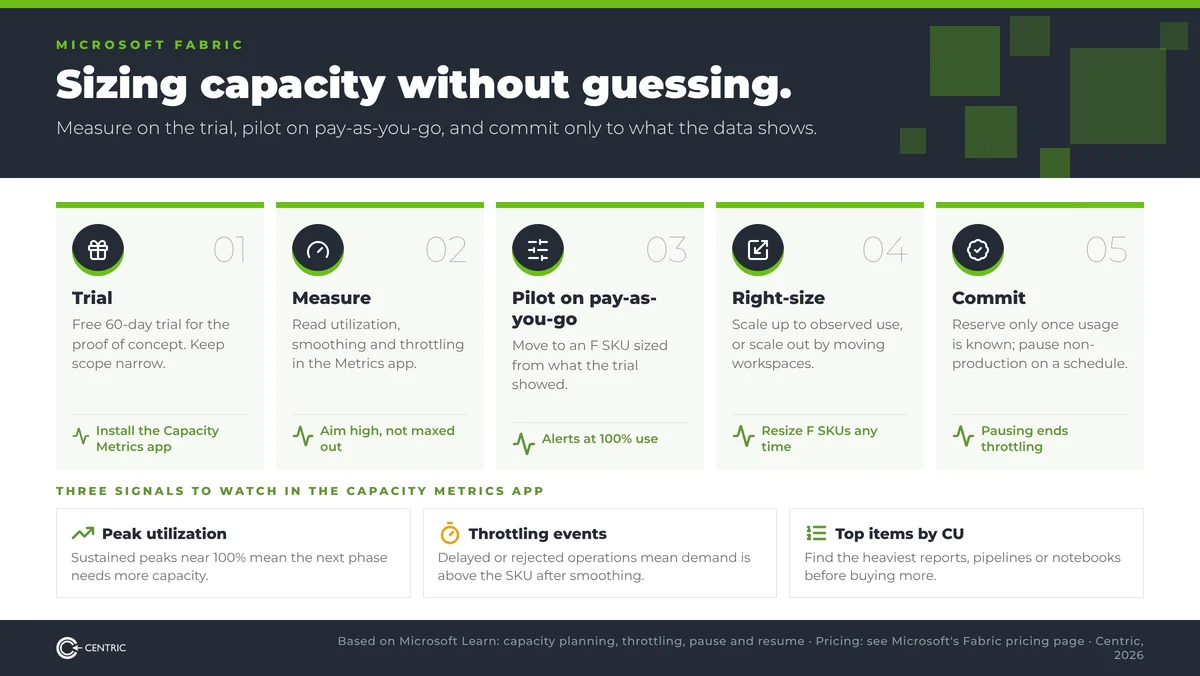
How Fabric handles spikes. Bursting lets an operation temporarily use more compute than the capacity provides, so jobs finish quickly. Smoothing then spreads that usage over future time, which is why a short spike doesn't immediately cause problems. Throttling starts only when demand stays above what the capacity allows after smoothing: first interactive operations are delayed, and under prolonged overload, requests are rejected.
The three signals to watch in the Capacity Metrics app:
- Peak utilization. Sustained peaks near 100% in the pilot mean production needs more capacity than the pilot had.
- Throttling events. Delayed or rejected operations mean demand is above what the SKU allows after smoothing. Resize, or reduce the load.
- Top items by capacity use. Before buying more, check which reports, pipelines or notebooks use the most CUs. A single inefficient refresh can be cheaper to fix than to fund.
What pausing does. Pausing a capacity ends any throttling immediately, adds the accumulated smoothed usage to your Azure bill at that point, and makes the content on that capacity unavailable until you resume it. That makes pause and resume a good fit for development and test capacities, scheduled outside working hours with an Azure runbook, and a poor fit for anything people use in production.
What it costs. This guide doesn't quote prices, because they vary by SKU, region and commitment. For current rates, see Microsoft's Fabric pricing page; for what drives the bill, see the cost section of what Microsoft Fabric is. Microsoft also offers a Fabric SKU Estimator (in preview) for a first estimate before you have measured data.

Four First Use Cases That Fit a 90-Day Plan
A good first use case answers one question a senior person asks every week, uses data you can reach, and shows a result people can count. These four are illustrative, based on Centric Fabric, BI and data services.
|
Use case |
Sources |
First output |
What to measure |
Centric service |
|
Month-end financial reporting |
ERP general ledger; budget spreadsheets |
One consolidated P&L and variance report |
Days to produce the reporting pack; manual spreadsheet steps removed |
|
|
Orders, inventory and shipments in one view |
ERP orders and inventory; warehouse or shipping system |
A daily operations dashboard |
Late orders caught before the customer calls; time spent assembling reports |
Microsoft Fabric; BI and reporting |
|
Account view for sales and service |
CRM; support tickets; billing |
An account health report for account managers |
Preparation time before account reviews; accounts flagged at risk |
Microsoft Fabric; data governance and MDM |
|
Product data and sales analytics |
PIM; ERP sales |
Product performance by channel, with data completeness |
Products with incomplete data; sales by channel in one place |
Microsoft Fabric; PIM and MDM |
The third and fourth use cases depend on clean master data: if the same customer or product appears under different IDs in different systems, fix that first, or the report will show the inconsistency.
Worked Example: An Operations Dashboard in 90 Days
This example is illustrative: a mid-sized distributor running use case 2.
- Phase 1: the operations director's question is "which orders will ship late this week, and why?" Sources are the ERP's orders and inventory tables and the shipping system's tracking data. Success means late orders flagged at least a day before the promised date. The operations director sponsors; the data lead owns delivery.
- Phase 2: on the trial capacity, the team lands both sources in a lakehouse, builds a clean layer that joins orders to shipments, and creates one semantic model and dashboard. The Capacity Metrics app shows that the nightly full refresh accounts for most of the capacity used, so the team switches to loading only changed records.
- Phase 3: the dashboard moves to a pay-as-you-go F SKU sized from the trial measurements, with development, test and production workspaces. Twenty planners and customer service leads use it daily. Monday mornings show the highest peaks but no sustained throttling.
- Phase 4: the team sizes production to cover the pilot's peaks, keeps pay-as-you-go for another quarter before deciding on reserved capacity, and schedules the development capacity to pause overnight. Next on the roadmap: month-end financial reporting, reusing the ERP data already landed.
How Centric Runs the First 90 Days?
Centric Microsoft Fabric team follows three steps that map onto this plan:
- Evaluate. We assess your current data landscape and align Fabric with your business and technical objectives, including capability assessment and license selection (Phase 1).
- Design and enable. We design the Fabric architecture and enable the core components: OneLake as the single, governed data layer, and lakehouse and warehouse components built for your workloads (Phases 2 and 3).
- Validate. We validate performance, governance and readiness before wider adoption, with workspace governance, security configuration and stakeholder enablement in place (Phases 3 and 4).
The platform is designed as the analytics backbone for what comes next: Power BI reporting, machine learning and Copilot.
Planning Your First 90 Days on Fabric?
Centric Fabric team helps you choose the first use case, prove it on your data and size capacity from real measurements.
Book Your Fabric Consultation!Frequently Asked Questions
How long does a Microsoft Fabric implementation take?
It depends on the scope. This plan takes one use case from choice to a production decision in about 90 days, which works when the data is reachable and the question is focused. Rolling Fabric out across many departments and data sources takes longer and is best done one use case at a time, reusing what the first one built.
Can we start Microsoft Fabric for free?
Yes, for a proof of concept. The Fabric trial capacity lasts 60 days and provides compute at no cost. Check its considerations before you start, for example whether AI and Copilot are in scope and which region to use, and move to a paid F SKU for the pilot.
How do we choose the right Fabric capacity size?
Measure it. Run the proof of concept on the trial capacity and the pilot on a pay-as-you-go F SKU, watch peak utilization and throttling in the Capacity Metrics app, and size production to cover what you observed. Microsoft's Fabric SKU Estimator (in preview) can give a first estimate before you have data, and reserved capacity makes sense only once usage is known.
Do we need F64?
Not necessarily. The right size depends on your workloads and on how your Power BI viewers are licensed. Our guide to Microsoft Fabric vs Power BI explains how licensing and capacity size interact.
What should our first Fabric project be?
One that answers a question a senior person asks every week, uses data you can reach, and produces a result you can count, such as month-end reporting, an operations dashboard, an account view or product performance by channel. Avoid starting with the hardest integration or the largest data set.
Final Thoughts
Staying small until the evidence says otherwise keeps a Fabric rollout fast and defensible. One use case, one trial capacity, one measured pilot, then a production decision you can explain line by line. After that, each new use case can build on the data, governance and team already in place