


Keyword traffic analysis is the practice of connecting keyword research with real traffic data to see which search terms actually bring visitors to your site. You find them in Google Search Console's Performance report, which lists the queries your pages appear for with clicks, impressions, click-through rate and average position, then use that evidence to decide what to create, improve or prune.
Key Takeaways
-
Keyword research predicts which terms could bring traffic; traffic analysis shows which ones actually do. Used together, they turn SEO from guesswork into evidence.
-
Google Search Console's Performance report is the first-party record of the queries your site appears for, with four metrics: clicks, impressions, click-through rate and average position (Google Search Central).
-
Search Console data goes back 16 months, and some queries are hidden to protect privacy, so individual query numbers will not always sum to your site totals (Google).
-
Average position is the topmost position your site held for a query, averaged across impressions, so one strong page can mask weaker ones ranking for the same term (Google).
-
The highest-value finding is usually a page ranking in positions 5 to 20 on a term with real impressions: a small improvement there moves it into the clicks zone.
Keyword research tells you which terms might bring traffic. Traffic analysis tells you which terms actually do. Most SEO advice stops at the first half, which is why so many sites target keywords that look promising in a tool but never convert into visitors. The real work is closing the loop: compare what you hoped would rank with what is ranking, and let the gap guide what you do next.
Centric runs this loop for US and Gulf organizations as part of SEO and reporting work, and the method is the same at any size. You pull the queries your pages already appear for, read them against your keyword research, and act on the mismatches. This guide shows exactly how to do that in Google Search Console and GA4, how the two disciplines reinforce each other, and the mistakes that waste the data.
What Is Keyword Traffic Analysis?
Keyword traffic analysis is the practice of connecting keyword research with traffic data to understand which search terms bring visitors to your site and how well each one performs. It joins two things that are usually done separately: the forward-looking research that estimates a term's potential, and the backward-looking analytics that measure what actually happened.
The output is a prioritized view of your keywords. Some terms you targeted are bringing traffic, some are not, and some are bringing traffic you never targeted at all. Each of those three cases points to a different action, which is what makes the analysis useful rather than just interesting. It builds directly on the fundamentals in what keyword research is and feeds into SEO reporting.
Keyword Research vs Traffic Analysis
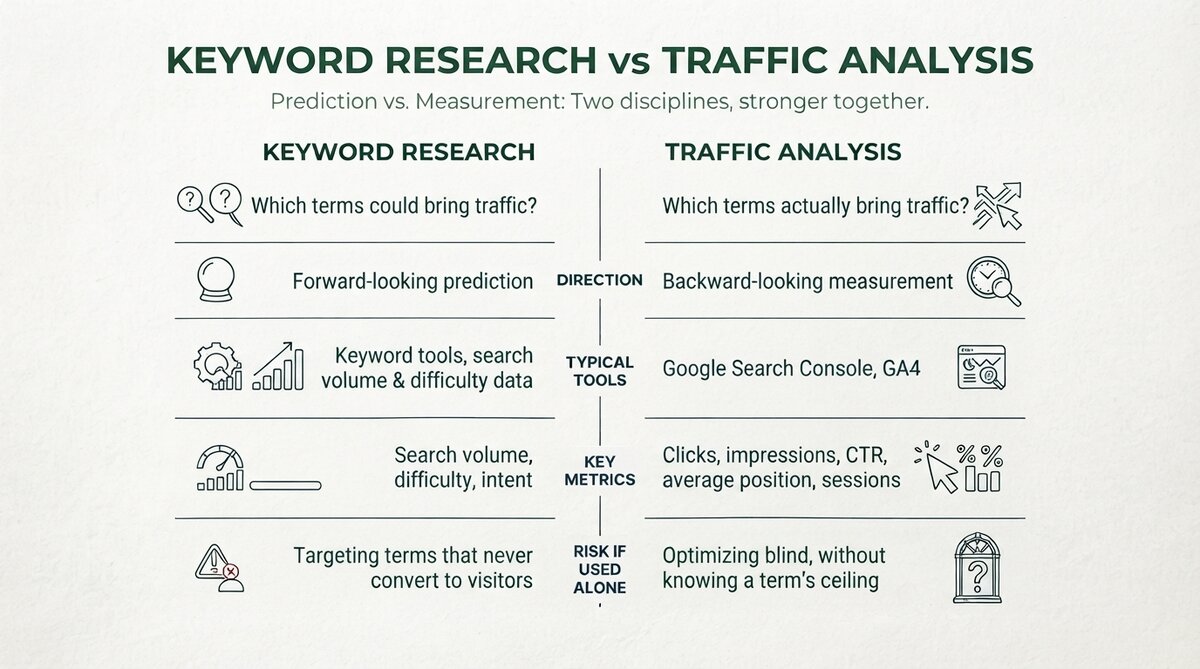
The two disciplines answer different questions and use different tools, which is why they are stronger together than apart. Keyword research is a prediction; traffic analysis is a measurement. The table sets them side by side so you can see where each one fits in the loop.
|
Aspect |
Keyword research |
Traffic analysis |
|---|---|---|
|
Question it answers |
Which terms could bring traffic? |
Which terms actually bring traffic? |
|
Direction |
Forward-looking prediction |
Backward-looking measurement |
|
Typical tools |
Keyword tools, search volume and difficulty data |
Google Search Console, GA4 |
|
Key metrics |
Search volume, keyword difficulty, intent |
Clicks, impressions, CTR, average position, sessions |
|
Risk if used alone |
Targeting terms that never convert to visitors |
Optimizing blind, without knowing a term's ceiling |
Used together they form a loop: research proposes, content targets, traffic analysis measures, and the result feeds the next round of research. That loop is the difference between an SEO programme that compounds and one that guesses. Difficulty and intent from research also explain why a high-impression term may never convert, which our guide to keyword difficulty covers.
Keyword Traffic Analysis by the Numbers (2026)
The facts below describe the data source you will rely on most, Google Search Console, so you read it correctly before acting on it. Each is from Google's own documentation, opened in November 2026, because misreading these metrics is the most common cause of wrong decisions.
|
Fact |
What it means for your analysis |
Source and date |
|---|---|---|
|
The Performance report carries four metrics: clicks, impressions, click-through rate and average position. |
These four are the vocabulary of keyword traffic analysis; learn to read them together. |
Search Console Help, Google, checked 13 November 2026 |
|
Search Console data goes back 16 months. |
You can compare this quarter with the same quarter last year, but no further. |
Search Console Help, Google, checked 13 November 2026 |
|
Some queries are hidden to protect privacy, so query numbers do not always sum to site totals. |
Do not treat the query list as complete; it is a large sample, not a full census. |
Google Search Central, October 2022 |
|
Average position is the topmost position held for a query, averaged across impressions. |
One strong page can mask weaker pages ranking for the same term; check per page. |
Search Console Help, Google, checked 13 November 2026 |
|
The interface exports up to 1,000 rows; the API returns up to 25,000 per request. |
For a large site, use the API or bulk export, not the interface, to see the long tail. |
Google Search Central, October 2022 |
|
Search Console data comes from the search index; GA4 data comes from on-site tracking. |
Search Console shows search-side visibility; GA4 shows what visitors do after the click. |
Search Console Help, Google, checked 13 November 2026 |
How to Find Which Keywords Drive Your Traffic
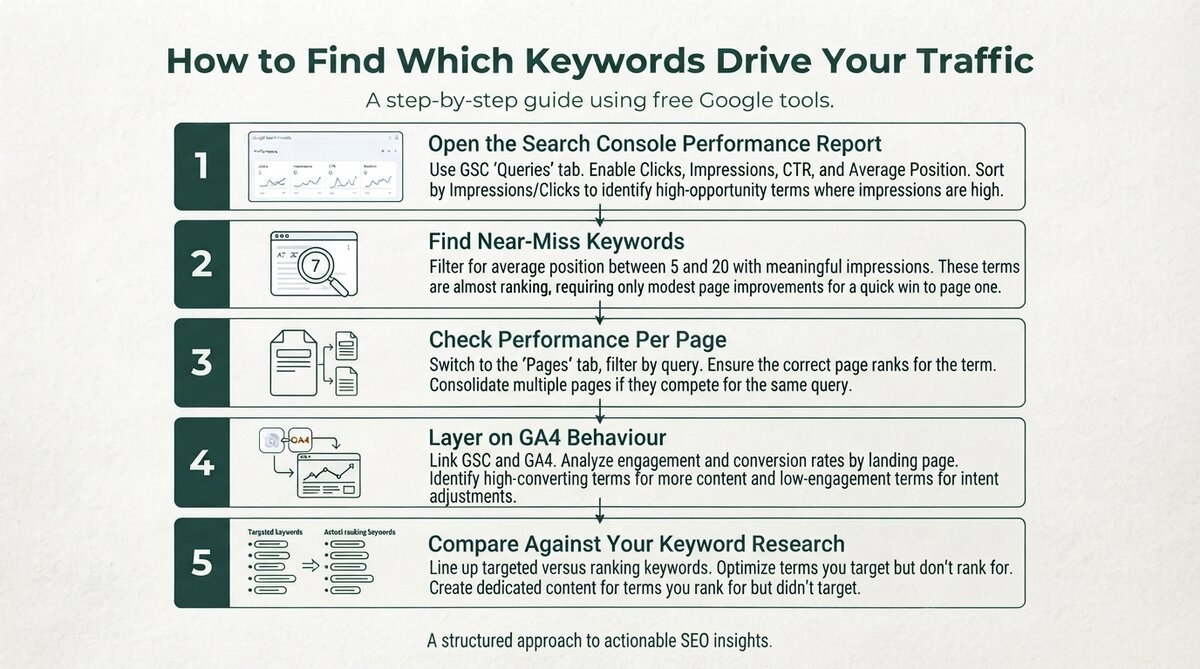
The process below uses free Google tools and takes an afternoon for a small site. Work the steps in order: start with what you already rank for, layer on behaviour, then compare against your research. Each step names the tool and the decision it supports.
Step 1: Open the Search Console Performance report
In Google Search Console, open Performance and enable all four metrics: clicks, impressions, CTR and average position. The Queries tab lists the search terms your site appeared for. Sort by impressions to see which terms Google already associates with you, and by clicks to see which actually bring visitors. The gap between high impressions and low clicks is where the opportunities hide.
Step 2: Find the near-miss keywords
Filter for queries where average position is between 5 and 20 and impressions are meaningful. These are terms you almost rank for: a page is on the second or lower first page, getting seen but not clicked. A modest improvement to one of these pages moves it into the top results, where the clicks are, which is usually a faster win than targeting a brand-new term.
Step 3: Check performance per page
Switch to the Pages tab, then filter by a specific query to see which page ranks for it. Because average position is the topmost result averaged across impressions, a single query can be served by the wrong page, or by several pages competing with each other. Finding two of your pages ranking for one term is a signal to consolidate them, a common fix covered in how to improve SEO ranking.
Step 4: Layer on GA4 behaviour
Search Console tells you which keywords bring visitors; GA4 tells you what those visitors do. Link the two, then look at engagement and conversions by landing page. A term that drives traffic but no engagement is attracting the wrong intent; a term with low traffic but high conversion is worth more content. The difference between the two tools is covered in Google Search Console vs Google Analytics.
Step 5: Compare against your keyword research
Line up what you targeted against what is actually ranking. Terms you targeted and rank for are working; keep them fresh. Terms you targeted but do not rank for need better content or were too competitive, which is where keyword difficulty explains the gap. Terms you rank for but never targeted are a gift: create dedicated content for them. This comparison is the heart of keyword traffic analysis.
Improve Your Search Visibility!

How Keyword Research and Traffic Analysis Connect
The two disciplines are not sequential steps but a continuous loop, and each reinforces the other. Research sets the hypothesis; traffic analysis tests it; the result sharpens the next hypothesis. The four connections below are where the value compounds, and they are why neither discipline should be run alone.
-
Research informs content. Keyword research shapes what you create and the terms you target, so the content has a chance to rank for demand that exists.
-
Traffic analysis validates performance. Search Console shows whether the terms you targeted actually earned impressions and clicks, turning a prediction into a measured result.
-
Together they guide optimization. The gap between targeted and actual rankings points to the pages worth improving, the near-misses worth a push, and the duplicates worth consolidating.
-
Iteration drives improvement. Each round of analysis feeds the next round of research, so the programme compounds rather than resetting each quarter.
Running this loop well is what separates an SEO strategy that builds momentum from one that stalls, which is why it sits at the centre of how to create an SEO strategy and feeds the dashboards built in business intelligence and reporting.
Common Keyword Traffic Analysis Mistakes
The data is free and first-party, but it is easy to misread, and a wrong reading leads to wasted content work. The table lists the mistakes that recur, why each one hurts, and what to do instead, each tied to how Google's metrics actually behave.
|
Mistake |
Why it hurts |
What to do instead |
|---|---|---|
|
Chasing volume, ignoring intent |
High-impression terms can bring visitors who never engage or convert |
Check GA4 engagement and conversions, not just Search Console traffic |
|
Reading average position as a fixed rank |
It is an average across impressions, so it hides page-level detail |
Filter by query and check which page ranks, and whether several compete |
|
Treating the query list as complete |
Google hides some queries, so the list is a sample, not a census |
Use it for direction, not for exact totals |
|
Targeting new terms before fixing near-misses |
You skip the fastest wins sitting in positions 5 to 20 |
Improve pages already on the edge of the clicks zone first |
|
Ignoring terms you rank for but never targeted |
You miss demand Google already connects to your site |
Create dedicated content for unexpected ranking terms |
|
Analyzing once and stopping |
Rankings and demand shift, so a one-off snapshot goes stale |
Run the loop on a schedule and compare over the 16-month window |
Frequently Asked Questions
These questions come from Google's People Also Ask results and from the queries that already bring readers to this page. Each answer is short and points to the detail above or to Google's documentation, so you can verify any claim before acting on it.
What is keyword traffic analysis?
Keyword traffic analysis is connecting keyword research with real traffic data to see which search terms bring visitors to your site and how well each performs. It joins the forward-looking research that estimates a term's potential with the backward-looking analytics, mainly Google Search Console and GA4, that measure what actually happened.
How do I find which keywords drive traffic to my website?
Open Google Search Console's Performance report and the Queries tab, which lists the search terms your site appeared for with clicks, impressions, CTR and average position. Sort by clicks to see what brings visitors, and by impressions to find terms you appear for but do not yet earn clicks on.
What is the difference between keyword research and traffic analysis?
Keyword research is a forward-looking prediction of which terms could bring traffic, using search volume and difficulty data. Traffic analysis is a backward-looking measurement of which terms actually did, using Search Console and GA4. Research proposes targets; analysis tests whether they worked. Together they form a loop that improves each round.
What tools do I need for keyword traffic analysis?
The essentials are free: Google Search Console for the search terms your pages appear for and their clicks, impressions, CTR and position, and GA4 for what visitors do after the click. Keyword research tools add search volume, difficulty and intent. Search Console data comes from the search index; GA4 from on-site tracking.
How far back does Google Search Console data go?
Search Console's Performance data goes back 16 months, so you can compare a period with the same period a year earlier but no further. Google also hides some queries to protect user privacy, which means individual query numbers will not always add up to your site's total clicks and impressions.
What is a good average position in Search Console?
Average position is the topmost position your site held for a query, averaged across impressions, so it is a guide rather than a fixed rank. Positions 1 to 3 earn most clicks; positions 5 to 20 are near-misses worth improving, because a page already seen for a term can often be pushed into the clicks zone.
Why does a keyword get impressions but no clicks?
Impressions without clicks usually mean the page ranks too low to be clicked, the title and description are not compelling, or the term's intent does not match the page. Check average position first; if it is on the second page, improve the page, and if it is high but still not clicked, rewrite the title and meta description.
Conclusion
Keyword traffic analysis closes the loop between what you hoped would rank and what actually ranks. Pull the queries your pages appear for in Search Console, find the near-misses in positions 5 to 20, layer on GA4 behaviour, and compare the result against your keyword research. The mismatches tell you what to create, improve or consolidate next.
Centric runs this loop for US and Gulf organizations as part of ongoing SEO and reporting work. If you want the fundamentals first, start with what keyword research is and how to create an SEO strategy, and see the toolset in our SEO tools.