





The SharePoint Admin Center is a central hub for managing and configuring SharePoint sites within an organization. It provides administrators with tools to control and optimize SharePoint site management and ensure seamless collaboration across teams.
Mastering the SharePoint Admin Center is crucial for businesses as it helps streamline daily operations, improve workflow efficiency, and enhance data security.
By understanding how to manage SharePoint site collections and implement proper SharePoint user permissions, organizations can safeguard sensitive information while maintaining productivity.
Whether you’re handling site creation, user access, or security settings, the SharePoint Admin Center is essential for efficient management.
Centric offers expert SharePoint consulting services to help organizations optimize their SharePoint Admin Center for maximum efficiency, ensuring a well-organized and secure SharePoint environment tailored to business needs.
In this guide, you will learn how to master the SharePoint Admin Center, a central hub for managing and configuring SharePoint sites. We’ll cover how to effectively manage SharePoint site collections, set up security and user permissions, and streamline operations for improved collaboration and efficiency across your organization.
What is the SharePoint Admin Center?
The SharePoint Admin Center is a powerful tool for managing and configuring SharePoint environments. It provides administrators with centralized control to handle everything from site creation to user permissions. Through SharePoint Strategy & Planning Services, businesses can plan and implement a cohesive SharePoint environment that aligns with organizational goals.
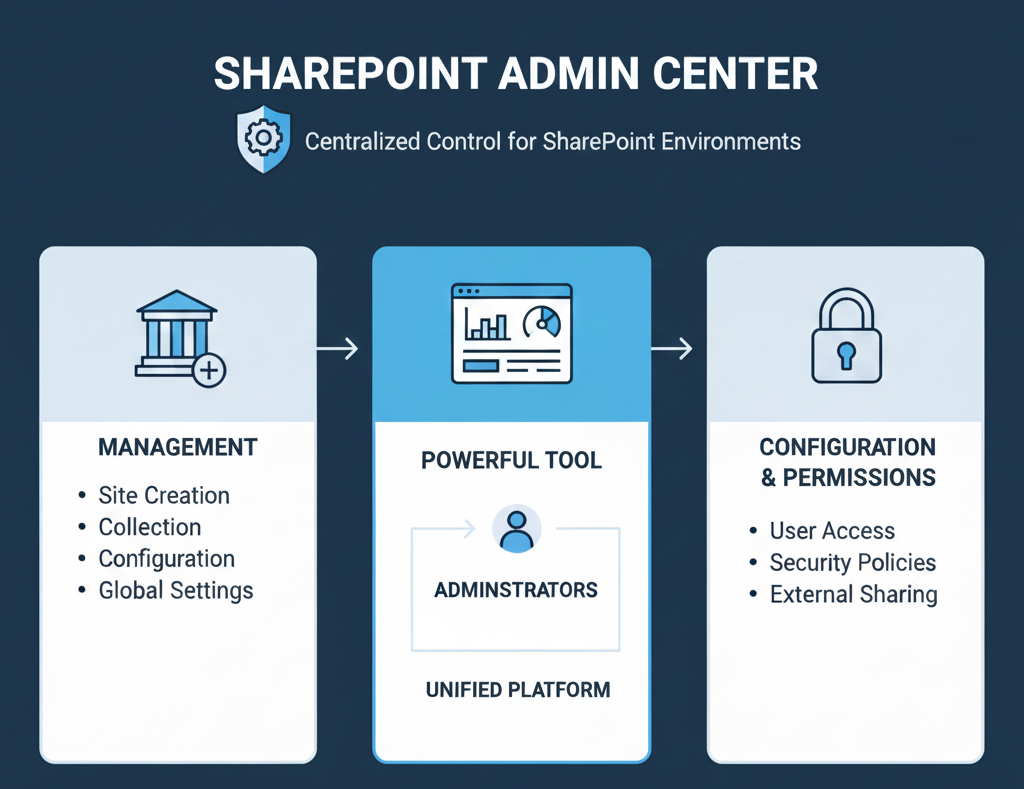
Through the SharePoint Admin Center, admins can configure security, manage content, and enforce policies across the organization. This centralized control ensures that businesses can maintain smooth operations while adhering to compliance requirements.
Core functions and features
The SharePoint Admin Center allows administrators to manage various aspects of their SharePoint environment. Key features include:
- Managing SharePoint sites: Creating, modifying, and organizing site collections.
- SharePoint security settings: Configuring security policies, managing user access, and protecting sensitive data.
- SharePoint admin roles: Assigning different administrative roles to users for tailored access to settings and features.
- SharePoint configuration: Customizing settings for content, workflows, and notifications to fit business needs.
Overview of the user interface and navigation
The SharePoint Admin Center offers a user-friendly interface designed to make SharePoint management easy and efficient. The dashboard provides quick access to important features such as site collections, user management, and security settings.
Administrators can easily navigate through menus to manage SharePoint security settings, assign roles, and review analytics for performance and compliance.
Maximize Efficiency with SharePoint Experts!
Why is the SharePoint Admin Center Essential for Organizations?
The SharePoint Admin Center plays a critical role in managing SharePoint sites and setting permissions. By centralizing the control of site creation, administrators can efficiently govern who has access to what data and ensure that the right users have the necessary permissions.
Centralized control in the SharePoint Admin Center ensures that admins can oversee all aspects of their SharePoint environment. This helps prevent mismanagement, security vulnerabilities, and unauthorized access, thus improving operational efficiency.
Administrative oversight is crucial for maintaining SharePoint security settings and ensuring compliance. The SharePoint Admin Center provides tools to monitor user activity, audit permissions, and enforce security measures, which are key for safeguarding sensitive information and adhering to industry regulations.
3 Key Features of the SharePoint Admin Center
The SharePoint Admin Center offers a wide range of features to help administrators manage their SharePoint environment efficiently. With tools for site management, user permissions, security, and compliance, the SharePoint Admin Center provides the flexibility needed for smooth operations.
By adhering to SharePoint administration best practices, businesses can ensure that their SharePoint environment runs securely and efficiently. The platform also integrates with other SharePoint administration tools, offering administrators the ability to customize and automate tasks using SharePoint PowerShell commands for advanced configurations.
1. Site Management
The SharePoint Admin Center allows administrators to easily create and manage SharePoint site collections. Site collections serve as containers for SharePoint sites, and the admin center enables admins to define their structure and permissions.
The platform also offers tools for setting up site templates and configurations, allowing businesses to standardize their SharePoint sites based on specific needs. Additionally, managing permissions for both site collections and individual users is simplified, enabling admins to control who has access to specific content and resources within SharePoint.
2. User and Group Management
The SharePoint Admin Center enables administrators to efficiently manage users within the SharePoint environment. Adding and removing users is made simple, allowing admins to quickly onboard new employees or offboard departing ones.
The admin center also allows for the management of user roles and permissions, ensuring that individuals have appropriate access based on their roles. Moreover, admins can create groups and configure sharing settings, which streamlines collaboration and ensures that team members have the right level of access to content.
3. Security and Compliance Features
Security and compliance are critical aspects of SharePoint management, and the SharePoint Admin Center provides robust features to support both. Admins can configure security policies to protect sensitive data, such as controlling external sharing and enforcing encryption.
Access control is simplified by defining security groups, ensuring that only authorized users can access certain resources. The admin center also includes compliance features like auditing and data retention policies, helping businesses ensure that they meet regulatory requirements and maintain proper records of user activity. Additionally, SharePoint document management tools ensure that businesses can track and organize important documents within a secure environment.
Explore Our SharePoint Development & Customization Services!
What Are The SharePoint Admin Center Settings and Customizations?
The SharePoint Admin Center allows administrators to customize and configure various settings to meet organizational needs. From configuring site collections to managing storage and implementing automated workflows, the admin center provides comprehensive tools for SharePoint site collection management.
By configuring settings for content types, lists, and libraries, businesses can create a highly customized SharePoint environment tailored to their workflows. Additionally, the SharePoint Admin Center helps in controlling access and enforcing SharePoint site permissions to ensure secure data management.
Managing SharePoint Online features such as storage and workflow automation can greatly enhance productivity while maintaining a high level of control over the SharePoint environment.
1. Configuring Site Collection Features
In the SharePoint Admin Center, admins can enable and disable features at the site collection level to match business requirements. This flexibility allows organizations to activate only the features they need while keeping the environment streamlined. Administrators can also customize settings for sharePoint content types, lists, and libraries, tailoring them to suit specific workflows.
These settings ensure that each site collection is optimized for the unique needs of users, improving the overall user experience and efficiency of SharePoint site collection management.
2. Administering Storage and Quota Management
The SharePoint Admin Center offers tools for managing storage and setting storage limits for site collections. Admins can allocate storage space based on the needs of each site collection, ensuring that resources are efficiently distributed.
The admin center also provides settings for managing storage usage and setting up alerts to notify administrators when storage limits are approaching. These tools help maintain a well-organized SharePoint environment by preventing storage overages and ensuring that resources are used effectively.
3. Workflow and Automation in SharePoint
Automating repetitive tasks in SharePoint can significantly improve efficiency, and the SharePoint Admin Center integrates with Power Automate to enable this. Admins can create custom workflows to automate tasks such as document approval, review, and notifications, saving time and reducing manual errors.
This customization of workflows ensures that tasks are completed quickly and consistently, which is vital for managing SharePoint Online environments with multiple teams and projects. By leveraging automation, businesses can streamline their operations and improve collaboration within the SharePoint environment.
Also Explore: How To Create a Calendar in SharePoint
3 Best Practices for Using the SharePoint Admin Center
Using the SharePoint Admin Center effectively requires a structured approach to manage site collections, user permissions, and security. Adhering to best practices ensures that your SharePoint environment remains secure, organized, and efficient.
By leveraging the SharePoint admin center features, administrators can easily configure settings for SharePoint site collections, implement robust SharePoint security settings, and streamline the process of managing data and users. Proper planning and ongoing management can prevent common pitfalls and ensure that SharePoint is used to its full potential.
1. Organizing and Structuring Your SharePoint Environment
When using the SharePoint Admin Center, it’s important to organize site collections and subsites in a way that is both logical and scalable.
Best practices for SharePoint site collections include grouping related sites into collections based on function or department, making it easier to manage and maintain them. Naming conventions and folder structures should be consistent across the organization to avoid confusion.
A clear and uniform naming system for sites, libraries, and documents helps improve navigation and ensures that everyone knows where to find resources, which also aids in maintaining a clean and efficient SharePoint environment.

2. Optimizing User Access and Permissions
Optimizing user access and permissions is a critical aspect of SharePoint Admin Center management. One of the best strategies for managing SharePoint site collections is to follow the principle of least privilege. Only grant users the minimum permissions required for them to perform their tasks.
This limits the exposure of sensitive data and helps maintain the integrity of the SharePoint environment. Managing permissions for large teams can become complex, but tools within the SharePoint Admin Center allow admins to efficiently assign and audit permissions.
It’s essential to regularly review and update SharePoint security settings to ensure that permissions are up to date, especially when users join or leave teams.
3. Backup and Disaster Recovery Planning
Backup and disaster recovery planning is an essential aspect of SharePoint administration. The SharePoint Admin Center offers tools to configure regular backups, ensuring that your SharePoint environment can be restored in case of data loss or system failure. Regular backups help prevent significant data loss and enable quick recovery in emergency situations.
Admins should configure backup settings and recovery options to suit their organization’s needs, setting up alerts and automated processes to ensure that backups occur regularly. Having a disaster recovery plan in place helps organizations avoid downtime and ensures that data is safe, reducing the risk of long-term operational disruption.
Troubleshooting Common SharePoint Admin Center Issues
The SharePoint Admin Center offers powerful tools for managing your SharePoint environment, but sometimes issues arise. Troubleshooting is an essential skill for SharePoint administrators to ensure the smooth operation of the platform.
From resolving user access issues to addressing performance and security concerns, the SharePoint Admin Center provides various solutions to keep your SharePoint environment running efficiently. By addressing common problems proactively, administrators can minimize downtime and maintain a secure, efficient SharePoint site.
1. Resolving Access and Permissions Issues
One of the most common issues in SharePoint is related to user access and permission inheritance. SharePoint site permissions can become complicated, especially when users have inconsistent or incorrect access levels.
Common problems include users being unable to access certain sites or content due to improper permission settings or inheritance issues. To fix this, administrators should review and adjust permissions within the SharePoint Admin Center, ensuring that inheritance is configured correctly for both site collections and individual users.
Additionally, it’s essential to check sharing settings and ensure that they align with organizational security policies, allowing only authorized users to access sensitive content.
2. Addressing Performance and Storage Concerns
Performance issues in SharePoint, such as slow load times or unresponsiveness, can negatively impact productivity. The SharePoint Admin Center allows administrators to monitor performance metrics and identify bottlenecks.
Tips for improving performance include optimizing large document libraries, archiving old or unused data, and limiting the use of heavy web parts or custom scripts that can slow down the site. Storage-related issues often arise when quotas are exceeded or when storage is poorly managed.
Admins can resolve these issues by adjusting storage quotas in the SharePoint Admin Center, monitoring usage, and setting up alerts to notify when limits are approaching. Regular storage audits help prevent issues and ensure that the SharePoint environment remains efficient and well-organized.
3. Handling Security Breaches and Compliance Violations
Security breaches and compliance violations are critical issues that can compromise the integrity of a SharePoint environment. If a potential security breach occurs, the first step is to review the SharePoint security settings and audit logs for suspicious activity.
In the SharePoint Admin Center, administrators can use the audit logs to track changes and identify unauthorized access. In the case of compliance violations, it’s essential to take immediate action to assess the scope of the issue and report it as per organizational policies.
Admins should ensure that all compliance settings are correctly configured in the SharePoint Admin Center, including data retention and user activity monitoring. Addressing these issues quickly helps prevent further violations and ensures that the organization remains compliant with regulatory requirements.
 Download PDF Now
SharePoint Admin Center and Integration with Other Microsoft 365 Services
The SharePoint Admin Center seamlessly integrates with other Microsoft 365 services, enhancing the overall productivity and functionality of SharePoint. By connecting SharePoint to Microsoft Teams, OneDrive, and Power BI, organizations can create a more collaborative and data-driven environment. SharePoint Migration & Integration Services enable businesses to seamlessly transition from legacy systems to SharePoint, ensuring a smooth integration with Microsoft 365.
These integrations streamline workflows, improve access to documents, and provide valuable insights from SharePoint data. Admins can manage these integrations directly from the SharePoint Admin Center, ensuring that all systems work together efficiently and securely.
1. Integrating SharePoint with Microsoft Teams
Integrating SharePoint with Microsoft Teams allows teams to collaborate more effectively by combining the power of SharePoint document libraries with the communication tools in Teams.
In the SharePoint Admin Center, administrators can easily set up SharePoint document libraries in Teams, enabling users to access and work on SharePoint files directly within the Teams interface. This integration fosters real-time collaboration, making it easier for teams to share, edit, and discuss documents without switching between platforms.
By managing collaboration and file-sharing between SharePoint and Teams, organizations can streamline workflows and increase productivity, ensuring that everyone has the right documents and information at their fingertips.
2. Synchronizing with OneDrive for Business
Syncing SharePoint libraries with OneDrive provides users with offline access to their files, making it easier to work on documents while not connected to the internet. By enabling synchronization, users can work on documents stored in SharePoint libraries directly from their OneDrive, which automatically syncs changes when they’re back online.
This setup is particularly beneficial for remote or mobile workers who need access to important files even when they’re disconnected from the corporate network. Admins can configure sync settings for offline access in the SharePoint Admin Center, ensuring that synchronization is set up correctly and securely.
The SharePoint Admin Center also allows admins to manage the sync settings, ensuring that users have the appropriate permissions and access levels when syncing SharePoint libraries with OneDrive.
3. Using Power BI with SharePoint Data
Power BI is a powerful tool for visualizing and analyzing data, and integrating it with SharePoint allows organizations to gain insights from their SharePoint data. Admins can configure the integration of Power BI with SharePoint directly from the SharePoint Admin Center, enabling the creation of interactive dashboards and reports based on SharePoint data.
By connecting Power BI to SharePoint, organizations can analyze usage trends, monitor content performance, and track key metrics related to document management.
Visualizing and reporting SharePoint data with Power BI allows businesses to make data-driven decisions and improve their overall SharePoint strategy, all while enhancing collaboration across teams with easy-to-understand reports and dashboards.
Check Out SharePoint Document & Content Management Services!
Frequently Asked Questions (FAQs)
What Is The SharePoint Admin Center Used For?
The SharePoint Admin Center is a central hub for managing and configuring SharePoint environments. It allows administrators to create site collections, manage user permissions, configure security settings, and monitor storage and performance across the organization’s SharePoint sites.
How Can I Manage User Permissions In SharePoint?
You can manage user permissions in the SharePoint Admin Center by setting up SharePoint site permissions and assigning specific roles to users. This allows you to control who can access, view, and edit documents, ensuring secure collaboration and data protection.
What Are SharePoint Site Collections?
SharePoint site collections are groups of SharePoint sites under a common administration. They allow for efficient organization of content and management of permissions, enabling administrators to easily control access and security at both the site collection and subsite levels.
How Does SharePoint Integrate With Microsoft Teams?
SharePoint integrates with Microsoft Teams by allowing users to access SharePoint document libraries within the Teams interface. This integration helps streamline collaboration, making it easier for teams to share, edit, and discuss documents in real time without switching between platforms.
Conclusion
Mastering the SharePoint Admin Center is crucial for ensuring a well-managed, secure, and efficient SharePoint environment. It provides administrators with the tools to manage site collections, configure security settings, and optimize performance across the platform.
By adopting best practices for security, management, and performance, businesses can ensure that their SharePoint environment supports collaboration, data security, and organizational growth.
Centric’s SharePoint consulting services can help you optimize and manage your SharePoint Admin Center to ensure long-term success and efficiency, enabling you to unlock the full potential of SharePoint for your business.






