





How to design a web page that looks good, loads fast, and converts visitors into users?
That is the real challenge behind modern web design. According to Google research, 53% of users leave a website if it takes longer than three seconds to load, proving that design is not just about looks, it directly impacts results.
Designing a web page starts with a clear goal and a deep understanding of the target audience. Before using any tool or writing a single line of code, you must define who the page is for and what action you want users to take.
A study by McKinsey shows that companies focusing on strong design outperform competitors by up to 32% in revenue growth, highlighting the business value of good design.
A well-structured page uses clean navigation, readable layouts, and visual balance to guide users smoothly. From wireframing to selecting fonts, colors, and spacing, every design choice affects user behavior.
Today’s web pages must also be fast, mobile-friendly, and accessible on all devices. Once the design is finalized, it moves through development, testing, and final launch.
This guide breaks every step into simple, practical actions so you can move from idea to a polished, professional web page with confidence.
What is a Web Page?
A web page is a single document on the internet that users can view in a web browser. It is part of a website and is used to display information such as text, images, videos, links, and interactive content.
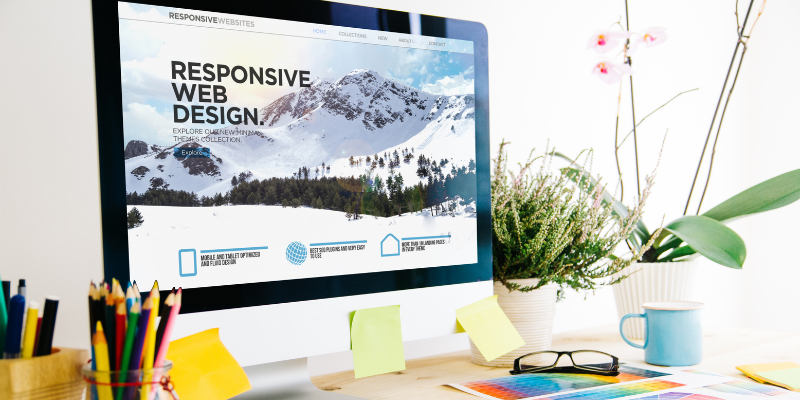
Each web page has its own unique URL and serves a specific purpose, such as sharing information, promoting a product, collecting user details, or providing services.
Web pages are created using technologies like HTML, CSS, and JavaScript and are designed to be accessible across different devices and screen sizes.
What You Need to Design a Web Page?
|
Item |
Why It Matters |
|
A Domain Name |
Your domain is your website’s address online (e.g., example.com) and helps people easily find your business. |
|
Web Hosting |
Hosting stores your website’s files and makes sure your site is always accessible to visitors. |
|
A Website Builder or CMS |
Tools like Wix give you everything you need to design and manage your site, from customizable templates to built-in features. |
|
Design Assets |
High-quality images, videos, and fonts make your website look professional and engaging. |
What Makes a Good Web Page?
A good web page is clear, well-organized, and easy to use. It helps visitors understand the purpose of the page within seconds and allows them to find what they need without confusion.
Fast loading speed keeps users from leaving early and improves overall user experience. Clean and consistent design builds trust and gives a professional look, highlighting Why UX Design Strategy Is Important for business success.
Strong, simple messaging helps users understand what is being offered and why it matters. Every section on the page should serve a purpose and guide users toward the right action, whether that is learning more, signing up, or making a purchase.
12 Key Elements of Modern Web Design
Modern web design prioritizes simplicity, clean structure, and responsive layouts.
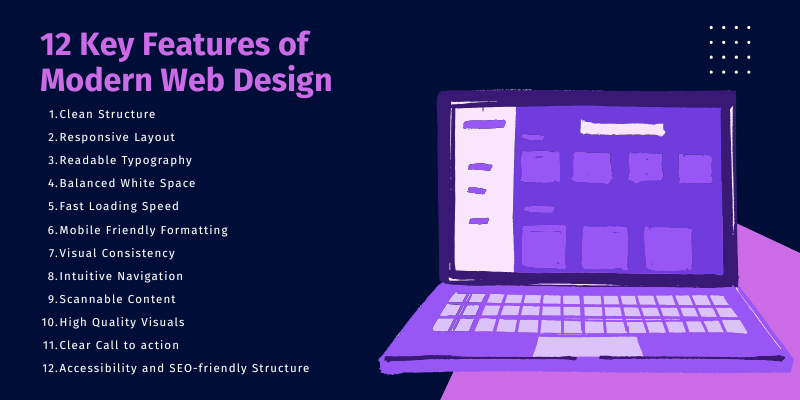
Key features include easy readability, fast load times, and mobile compatibility.
1. Simplicity and clean structure
A simple layout helps users focus on the content without distraction. Clean structure improves navigation and reduces confusion. It also helps pages load faster and feel more organized.
2. Responsive layouts for all devices
Responsive design ensures the web page adjusts smoothly to all screen sizes. It provides a consistent experience on desktops, tablets, and smartphones without breaking the layout.
3. Readable typography for better legibility
Clear fonts with proper size and spacing make content easier to read. Good typography reduces eye strain and helps users stay on the page longer.
4. Balanced white space for visual clarity
White space gives content room to breathe. It improves focus, reduces clutter, and helps users understand the layout more easily.
5. Fast loading speed to enhance user experience
Fast websites keep visitors engaged. Slow pages increase bounce rates and hurt search rankings. Speed also improves mobile performance.
6. Mobile-friendly formatting for on-the-go access
Mobile users now dominate web traffic. Buttons, menus, and text must be easy to tap and scroll on small screens.
7. Visual consistency to maintain brand identity
Using the same colors, fonts, and styles across pages builds trust. It also strengthens brand recognition and user confidence.
8. Intuitive navigation for easy browsing
Users should find what they need without effort. Simple menus, clear labels, and logical page flow improve usability.
9. Scannable content for quick information access
Most users scan instead of reading every word. Headings, bullet points, and short sections help users absorb information quickly.
10. High-quality visuals to engage users
Images, icons, and graphics make content more appealing. Poor visuals reduce trust and lower engagement.
11. Clear call-to-action buttons to drive engagement
Buttons guide users to take action. Strong CTAs improve sign-ups, inquiries, and conversions. Their placement and visibility matter.
12. Accessibility and SEO-friendly structure
Accessible design supports all users, including those with disabilities. SEO-friendly structure helps search engines understand and rank your pages better.
When these elements work together, they create a smooth browsing experience that keeps users engaged and encourages action. A well-designed web page supports both user needs and business goals at the same time.
How to Design a Web Page?
Want to learn how to design a web page from scratch? Good design starts with planning, structure, and understanding your users. A well-designed web page is clean, responsive, and easy to navigate.
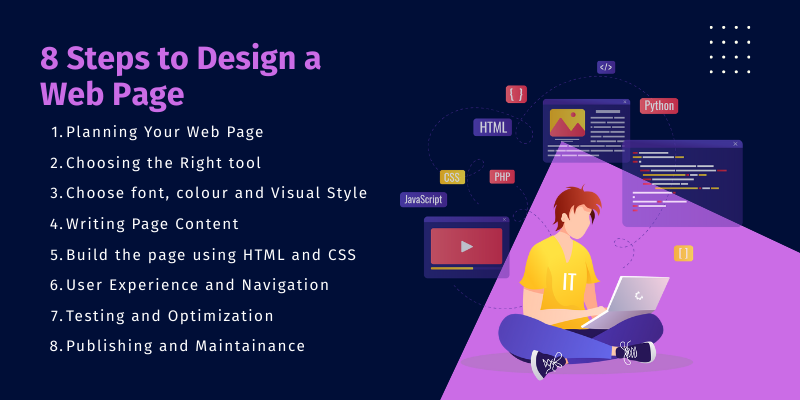
Here are the key steps to move from idea to a polished launch.
- Planning Your Web Page
- Choosing the right tools
- Choose fonts, colors, and visual style
- Writing Page Content
- Build the page using HTML and CSS
- User Experience and Navigation
- Testing and Optimization
- Publishing and Maintenance
Let’s explore each in detail.
1. Planning Your Web Page
Before designing anything, you need a clear vision. Planning helps you stay focused, organize information properly, and design a page that truly serves users.
This stage builds the foundation for layout, visuals, and UX design, and it is organized into two key parts.
Start by understanding why the page exists and who will use it.
Ask:
- What problem does this page solve?
- What action should visitors take? (Learn, sign up, buy, contact)
- Who are the users and what do they care about?
When you know the goal and audience needs, you can tailor content, tone, layout, and features that genuinely support user expectations and business objectives.
Map out how the page will be organized. Sketch a simple layout showing main sections such as header, hero area, content blocks, features/services, CTA, and footer.
Use wireframes to visualize placement of text, buttons, and images before adding colors or design elements. This step ensures clarity, logical flow, and easier design decisions later.

2. Choosing the Right Tools
Selecting the right tools makes designing and building a web page easier, faster, and more organized.
Design tools help you visualize layouts and plan your interface, while development tools allow you to turn those designs into functional pages.
Using professional tools ensures consistency, better collaboration, and efficient workflow from idea to finished product, especially when partnering with expert Design Services.
The two key elements of choosing the right tool are
-
Design Tools (Figma, Adobe XD)
Used to create wireframes, mockups, and UI prototypes. They offer drag-and-drop components, grid layouts, and real-time collaboration for smooth design planning.
-
Development Tool
VS Code helps you write clean HTML, CSS, and JavaScript with smart suggestions and extensions. Git manages code versions, tracks changes, and supports teamwork by keeping your project organized and backed up.
3. Designing Layout & Visuals
Strong visuals shape how users experience your web page. A clean layout, balanced spacing, and consistent styling help viewers navigate easily and stay engaged.
By applying grid systems and choosing the right colors, fonts, and icons, you create a visually appealing and user-friendly page through effective UI Design that reflects your brand.
The two main features of design and layout are
-
Grid Systems And Spacing
Provide structure, improve readability, and prevent clutter by organizing elements evenly with proper alignment and consistent padding and margins.
-
Colors, Fonts, And Icons
Build brand identity and guide user attention through well-chosen color palettes, readable typography, and supportive icons used consistently across the design.
4. Writing Page Content
Your page content shapes how users understand your message and take action. Strong content creation ensures that information is clear, engaging, and encourages users to interact.
Clear, simple, and meaningful text makes information easy to digest, while strong visuals and calls-to-action guide visitors through the page. Good content not only informs but also engages and encourages users to interact.
This includes:
-
Clear Headlines and Scannable Text
Use short, direct headings and break content into short paragraphs or bullet points. This helps users quickly find the information they need and keeps them engaged without overwhelming them.
-
Adding Images, Videos, and CTAs
Support your message with visuals like images and videos to make content more appealing. Add clear CTAs (call-to-action buttons) to guide users toward the next step, whether it’s signing up, learning more, or making a purchase.
5.Building the Web Page
Once the design and content are ready, it’s time to turn your vision into a working web page through professional Web Design And Development. This stage involves writing clean code, structuring content properly, and applying styling to match your design.
A solid foundation with HTML and clean CSS ensures your page loads well, looks professional, and functions smoothly across devices.
The two key elements include
-
HTML Structure
Use HTML to build the backbone of your page. Organize elements like headers, sections, paragraphs, buttons, and images in a clear hierarchy for better readability, accessibility, and SEO. Proper tags and semantics help browsers and search engines understand your content.
-
CSS Styling
Apply CSS to add colors, fonts, spacing, and design structure. Use Flexbox or CSS Grid for layouts, maintain consistent spacing, and follow responsive rules so your page adapts well on mobile, tablet, and desktop. Clean and organized CSS improves performance and future edits.
6. User Experience & Navigation
A seamless browsing experience is essential for keeping users engaged. When a website is easy to explore and understand, visitors are more likely to stay longer, find what they need, and take action.
Strong navigation combined with accessibility ensures that every user, regardless of device or ability, can interact with your page comfortably.
This stage focuses on two key elements:
-
Menu Design And Structure
Keep navigation simple, clear, and easy to follow. Use short, descriptive labels, organize links logically, and ensure menus work smoothly on all screen sizes, including mobile.
-
Accessibility Practices
Make your design inclusive by adding alt text for images, ensuring color contrast, using readable fonts, enabling keyboard navigation, and structuring headings properly so everyone can browse with ease.
7. Testing & Optimization
Before publishing your web page, it’s crucial to test how it performs and behaves across different platforms.
This ensures users enjoy a smooth, fast, and consistent experience no matter which device or browser they use.
Proper testing helps catch errors early, improve loading speed, and remove anything that may affect usability.
There are two essential components in this process:
-
Performance Testing
Check how fast your page loads and optimize images, code, and scripts to reduce delays. Use tools like Google PageSpeed Insights or Lighthouse to identify issues such as large files, unused code, or slow server responses. Fast performance creates a better user experience and supports SEO.
-
Browser and Device Testing
Test your page across multiple browsers (Chrome, Firefox, Safari, Edge) and on different devices like mobiles, tablets, and desktops. This ensures your layout, visuals, and features work consistently everywhere. Fix any alignment, display, or functionality issues before going live for a smooth cross-platform experience.
8. Publishing and Maintenance
Once your web page is designed, built, and tested, the final step is putting it online and keeping it updated.
Publishing allows users to access your site, while ongoing maintenance ensures it stays fast, secure, and relevant.
A website is not a one-time task it needs consistent attention to perform well over time.
This step has two essential components:
-
Hosting and Domain Setup
Choose a reliable hosting provider and register a domain name that reflects your brand. Upload your website files, configure DNS settings, and set up basic security, such as SSL. This step makes your website live and accessible to visitors across the internet.
-
Regular Updates and SEO Checks
Maintain your site by updating content, fixing bugs, improving speed, and checking SEO performance. Refresh pages regularly, update plugins or scripts, monitor analytics, and optimize keywords. Consistent improvements help keep your website secure, user-friendly, and visible in search engines.
Conclusion
Looking to understand how to design a web page and turn an idea into a functional online experience? The process blends planning, creativity, and execution to build something clear, attractive, and easy to use. Begin by defining your page’s purpose and audience, then outline the layout through wireframes, an approach commonly guided by experts of digital marketing agency, Centric to ensure strategic alignment. Select your colors, fonts, and visual style, and use the right design and development tools to shape your concept. After designing, write simple and compelling content, build your layout with clean code, and ensure the page performs well on all devices. Test speed, fix issues, launch the site, and continue improving it with updates. To conclude, a well-designed web page comes from thoughtful planning, consistent design, and ongoing refinement.





