





A technical SEO site audit is a critical evaluation of a website’s infrastructure to ensure it is optimized for search engines while providing an optimal user experience. If you’re wondering how to conduct a technical SEO site audit, it involves assessing various back-end elements that influence how search engines crawl, index, and understand the site.
Unlike content or off-page SEO, which focuses on content quality and backlinks, technical SEO dives into the back-end elements that influence how search engines crawl, index, and understand the site.
It addresses the site's core structure, speed, and functionality, ensuring that it aligns with search engine guidelines and performs effectively.
The primary purpose of a technical audit is to identify any issues that may be hindering a website's visibility on search engine result pages (SERPs). These issues can range from poor crawlability to slow page load speeds and improper use of canonical tags.
By identifying these barriers, a technical SEO audit ensures the site complies with SEO best practices, improving overall performance.
Additionally, technical audits help uncover opportunities to enhance site usability and boost user engagement, such as optimizing mobile-friendliness and refining URL structures.
Therefore, regular technical SEO audits are essential for maintaining a competitive edge in the digital landscape.
What Is a Technical SEO Audit?
A Technical SEO Audit is a process of evaluating a website's technical setup to ensure it meets the best practices required for optimal performance in search engine rankings.
It focuses on identifying and fixing any technical issues that could prevent search engines from crawling, indexing, or ranking the website properly.
The audit looks at various elements of the site, such as its structure, speed, security, mobile responsiveness, and overall crawlability.
By resolving these technical problems, a technical SEO audit helps improve the website's search engine visibility, user experience, and site performance, leading to better organic traffic and higher rankings in search results.
Get Your Free AI SEO Audit Today!
How to Conduct a Technical SEO Site Audit?
To conduct a technical SEO site audit, you need to follow a structured approach that evaluates various technical aspects of your website. This process involves assessing the site’s crawlability, speed, security, and overall technical setup to identify any issues that may hinder search engine performance.
Leveraging professional SEO Services that use the right tools and methodologies, you can uncover hidden technical barriers and implement fixes that enhance your site's SEO and user experience. Here's a step-by-step guide to help you conduct a comprehensive technical SEO site audit.
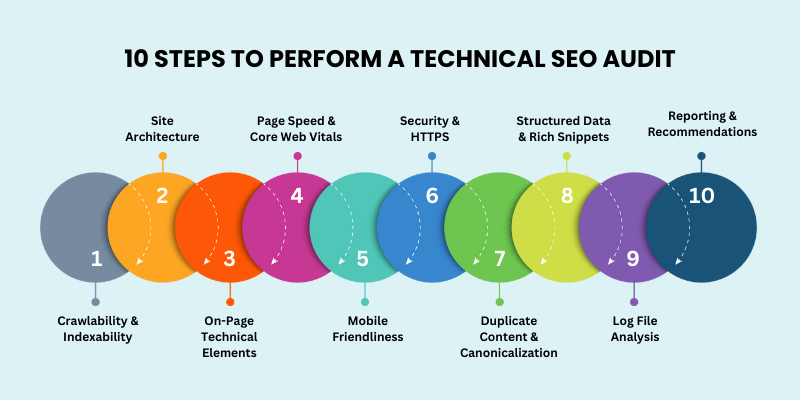
- Crawlability & Indexability
- Site Architecture & URL Structure Audit
- On-Page Technical Elements
- Page Speed & Core Web Vitals
- Mobile Friendliness & Responsiveness
- Security & HTTPS
- Duplicate Content & Canonicalization
- Structured Data & Rich Snippets
- Log File Analysis
- Reporting & Recommendations
Let’s explore each.
1. Crawlability & Indexability
Crawlability and indexability are essential elements of technical SEO site audits, ensuring that search engines can properly access and index your website’s pages.
Here’s a step-by-step approach to auditing these aspects
Run a Full Site Crawl
Use best seo audit tools like Screaming Frog, Sitebulb, or SEMrush to perform a tech site audit. These tools uncover technical issues such as broken links, missing meta tags, or duplicate content that could hinder search engines from crawling and indexing your pages effectively.
Check robots.txt for Crawl Restrictions
Review your robots.txt file to ensure that it doesn’t unintentionally block important pages from being crawled as part of your detailed SEO technical audit. This file instructs search engines on which pages to crawl and which to avoid, so it’s essential that it’s configured properly.
Audit Meta Robots Tags
Inspect the use of meta robots tags (such as noindex, nofollow, and canonical) across your pages. These tags control whether pages are indexed by search engines or linked to other pages. Ensuring proper use prevents important content from being excluded from search results or duplicate content issues.
Review XML Sitemap
Check that your XML sitemaps are accurate, up-to-date, and submitted as part of your technical site audit guide SEO. An outdated sitemap can lead to pages being overlooked by search engines, negatively impacting indexing and visibility.
Identify Orphan Pages and Analyze Crawl Depth
Orphan pages, or pages without internal links pointing to them, can be difficult for search engines to find. Use a crawling tool to identify these pages and ensure all important content is easily discoverable.
2. Site Architecture & URL Structure Audit
A well-organized site architecture and clear URL structure are vital for both user experience and SEO. As part of a professional technical SEO site audit, ensure that your site follows a logical hierarchy that is easy for search engines and users to navigate.
Here’s how to audit these aspects
Evaluate Logical Hierarchy of Pages (Silo Structure)
Assess the site hierarchy to ensure it follows a logical, organized structure. A silo structure groups related pages under broader categories, helping both search engines and users easily navigate and understand the site’s content.
Ensure that high-priority pages are easily accessible and properly linked within their respective categories.
Check URL Formats
Review your URL formats to ensure they are clean, concise, and keyword-friendly. URLs should be lowercase, hyphenated (instead of underscores), and contain relevant keywords to improve both SEO and user experience. Avoid using long, complex URLs with unnecessary parameters.
Review Internal Linking Strategy
Examine your internal linking strategy to ensure that it provides a clear path for search engines to crawl your site. Internal links should connect related content, directing users to other relevant pages.
This enhances SEO by distributing link equity and helps search engines understand the relationship between different pages.
Verify Breadcrumb Implementation
Check that breadcrumbs are implemented across your site, especially on category or product pages. Breadcrumbs provide clear navigation for users and allow search engines to better understand the structure of your site. This can also improve your site’s visibility in search results by enabling rich snippets.
3. On-Page Technical Elements
Optimizing on-page technical elements is key to enhancing SEO and improving the user experience.
Here's how to audit these critical components:
Titles, Meta Descriptions, and Headings
Ensure that your title tags, meta descriptions, and headings are:
-
Optimized with relevant keywords.
-
Unique for each page to prevent duplication.
-
Properly formatted, with title tags under 60 characters and meta descriptions around 150-160 characters for better visibility in search results.
-
Headings should follow a logical structure, with a single H1 tag on each page and subsequent H2, H3 tags used in a hierarchical manner to organize the content.
-
Canonical Tag
Verify the use of canonical tags to avoid duplicate content issues. The canonical tag helps search engines identify the original version of a page when there are multiple pages with similar content, consolidating link equity and preventing penalties for duplication.
Schema Markup and Structured Data
Implement schema markup (structured data) to provide more context to search engines about your content.
Structured data enables rich snippets in search results, such as star ratings, event dates, and product information. Ensure your schema is correctly set up for various content types, including articles, products, FAQs, etc.
Hreflang Tags (For Multilingual Websites)
For multilingual or multi-regional sites, use hreflang tags to specify the correct language and regional targeting for each page.
These tags help search engines serve the appropriate version of a page to users in different languages or regions, improving both rankings and user experience. Ensure that hreflang tags are correctly implemented and linked to the respective language versions of your pages.
Start Improving Your SEO Today
4. Page Speed & Core Web Vitals
Page speed optimization and Core Web Vitals are crucial for both SEO and user experience. Incorporating these factors into your SEO site technical audit ensures that your site loads quickly and provides a smooth browsing experience for users and search engines alike.
Here’s how to audit and optimize these elements
Test Using Google PageSpeed Insights and Lighthouse
Use Google PageSpeed Insights and Lighthouse to test your site’s speed and overall performance.
These tools provide a comprehensive analysis of how fast your site loads and offer actionable insights for improvement.

Review Largest Contentful Paint (LCP), First Input Delay (FID), and Cumulative Layout Shift (CLS)
Focus on the Core Web Vitals:
-
Largest Contentful Paint (LCP) measures how long it takes for the largest visible element (e.g., an image or block of text) to load. Aim for an LCP of under 2.5 seconds.
-
First Input Delay (FID) measures how quickly the site responds to user interactions. Aim for an FID of under 100 milliseconds.
-
Cumulative Layout Shift (CLS) measures visual stability by tracking unexpected layout shifts. Aim for a CLS score of less than 0.1.
-
Optimize Images, Lazy-Loading, and Compression
Optimize images by compressing them without sacrificing quality, using modern formats like WebP.
Implement lazy-loading for images and other media to improve initial page load times by loading non-essential content only when it's visible on the screen.
Check Server Response Times and Caching
Review server response times to ensure fast delivery of your pages. Implement caching strategies for static content to reduce load times for returning users.
Consider using a content delivery network (CDN) to further speed up content delivery across different regions.
5. Mobile-Friendliness & Responsiveness
Ensuring your website is mobile-friendly and responsive is crucial in today’s digital landscape, as a significant portion of web traffic comes from mobile devices.
Start by validating your website using Google’s Mobile-Friendly Test, which checks if your site is optimized for mobile users and provides recommendations for improvement.
Make sure your website has a responsive design that adjusts seamlessly across different screen sizes. This includes configuring proper viewport settings to ensure that the layout scales correctly for mobile screens.
The use of fluid grids and flexible images will also ensure a consistent user experience across various devices.
In addition, test touch elements, such as buttons and forms, to ensure they are easy to interact with on mobile devices. Buttons should be large enough to tap comfortably, and forms should be simple to navigate, with properly sized input fields and clear labels.
By focusing on mobile usability, you enhance both user experience and SEO performance, as Google prioritizes mobile-friendly sites in search rankings.
6. Security & HTTPS
Website security is essential not only for protecting user data but also for building trust with visitors and improving SEO rankings. During a technical website audit report, check for SSL implementation and mixed content issues to ensure that your site maintains a secure HTTPS connection.
Start by confirming that SSL (Secure Sockets Layer) is implemented across all pages of your website. SSL ensures that all data exchanged between the user and the site is encrypted, providing a secure connection.
Websites with SSL certificates use HTTPS in their URLs, which is now a standard for all trustworthy websites.
Next, check for mixed content issues. Mixed content occurs when a website served over HTTPS loads elements (such as images, scripts, or stylesheets) over HTTP.
This can lead to security vulnerabilities and warnings in browsers, which may discourage users from engaging with your site. Ensure that all resources on your site are served over HTTPS.
7. Duplicate Content & Canonicalization
Duplicate content can confuse search engines, potentially leading to lower rankings or missed opportunities to rank. To avoid this, start by detecting duplicate pages, thin content, and parameterized URLs that may result in multiple versions of the same content.
Tools like Ahrefs or Semrush can help identify pages with duplicate content, ensuring they are consolidated or removed.
Additionally, check that canonical tags are properly implemented. Canonical tags indicate to search engines which version of a page should be considered the primary one, preventing issues with duplicate content.
8. Structured Data & Rich Snippets
Structured data enhances how your content appears in search results by enabling rich snippets, which provide more detailed and visually appealing results.
To ensure proper implementation, begin by auditing your website’s use of JSON-LD, Microdata, or RDFa formats for structured data. JSON-LD is the recommended format by Google, as it is easier to implement and maintain.
Next, use Google’s Rich Results Test to verify that your structured data is correctly implemented and eligible for rich snippets.
Lastly, ensure that the schema types used in your structured data audit it align with the content of your pages.
Also, proper schema implementation helps search engines understand the content better, leading to better visibility and engagement in search results.
9. Log File Analysis
Log file analysis provides valuable insights into how search engines crawl your website.
Start by extracting and analyzing the server logs to see how search engines are interacting with your site. This includes identifying which pages are being crawled, how often, and the response codes associated with each crawl request.
Look for any crawl errors (such as 404s, 500 status code) or slow-loading pages that might hinder search engines from effectively crawling and indexing your content.
Next, focus on crawl waste. This refers to resources (such as duplicate or low-value pages) that are being crawled unnecessarily, taking up crawl budget and hindering search engine efficiency.
Look for unnecessary pages like login forms, admin panels, or duplicate content that can be excluded from crawling using robots.txt or noindex tags.
10. Reporting & Recommendations
Once the technical SEO audit is complete, it’s essential to document the issues discovered, categorized by their severity, to provide a clear roadmap for improvements.
This ensures that the most pressing issues are addressed first and that the SEO team can tackle tasks in a structured and effective way.
Document Issues by Severity
Classify each identified issue into one of the following severity levels:
-
Critical: Issues that significantly impact user experience or search engine crawling (e.g., broken pages, 404 errors, site downtime).
-
High: Issues that affect SEO performance and site visibility but are less urgent than critical ones (e.g., missing meta tags, slow page load times).
-
Medium: Issues that may not have an immediate impact but still require attention (e.g., minor technical errors, minor UX improvements).
-
Low: Issues that are not urgent but can be addressed as part of continuous improvement (e.g., minor content issues, outdated links).
Provide Actionable Fixes and Prioritize Them. For example, if a page is returning a 404 error, recommend implementing a redirect to the correct page or removing the broken link. Prioritize fixes based on their severity and potential impact on SEO performance.
Run a Free SEO Report For Your Website
Frequently Asked Questions (FAQs)
What is a Technical Audit for SEO Website?
A technical SEO audit evaluates the underlying infrastructure of your website to ensure it’s optimized for search engines. This includes checking site speed, mobile usability, crawlability, security, and overall structure to ensure the site is indexable and performs well in search rankings.
Why Perform Technical SEO Audit?
Performing a technical SEO audit is important because it helps identify and fix issues that may be hindering your website’s performance and visibility in search engines. It ensures that search engines can crawl, index, and rank your site efficiently, improving your chances of ranking higher in search results
How to do a Technical Site Audit?
A technical site audit involves analyzing various technical aspects of your website, including crawlability, site speed, mobile-friendliness, and security. Tools like Google Search Console, Screaming Frog, and SEMrush can help identify issues that may affect performance, visibility, and user experience.
How to Conduct a Single Page Technical SEO Audit?
To conduct a single-page SEO audit, focus on factors like page load speed, mobile responsiveness, meta tags, content quality, and internal linking. Use tools like GTmetrix or Google PageSpeed Insights to evaluate performance and ensure the page is optimized for both search engines and users.
Conclusion
A technical SEO audit is crucial for optimizing your website for both search engines and users.
Knowing how to conduct a technical SEO site audit allows you to thoroughly evaluate various technical factors such as crawlability, page speed, mobile-friendliness, and security. By doing so, you can pinpoint and address issues that may be hindering your site’s performance and visibility.
At Centric, we understand that resolving these issues not only improves your chances of ranking higher in search results but also enhances the overall user experience.
This leads to better engagement, higher conversion rates, and a more user-friendly website. Regular technical audits are essential for staying competitive in an ever-changing digital landscape.
Adopting a structured approach and using the right tools ensures that your website remains technically optimized, fully indexed, and prepared to deliver consistent results.
Regular audits and timely fixes will help maintain your site's SEO health and long-term success.






